



Intel Core Ultra CPUs for Gaming, Streaming and Productivity: What Should You Buy?
Choosing the right processor can make a major difference when building a new PC. Whether you want a gaming PC, streaming setup, or productivity workstation, the CPU needs to match the way you use your system.
Intel's Core Ultra desktop processors offer a range of options for users who want strong performance across gaming, content creation, multitasking, and everyday productivity. But which Intel Core Ultra CPU should you buy?
Let's look at what matters when choosing an Intel Core Ultra processor for gaming, streaming, and productivity.
What Is Intel Core Ultra?
Intel Core Ultra is Intel's newer processor family, designed around modern CPU architectures and platform features. Depending on the specific model, Core Ultra processors combine performance-focused cores and efficient cores to handle different types of workloads.
This hybrid approach allows the CPU to manage demanding applications while also handling background tasks and everyday workloads efficiently.
However, choosing a processor should not be based on the Core Ultra name alone. Core count, clock speeds, cache, power characteristics, motherboard compatibility, and your intended workload all matter.
Intel Core Ultra for Gaming
For gaming, the CPU works alongside the graphics card to process game logic, physics, AI, background tasks, and other calculations.
If you are building a high-FPS gaming PC, the processor becomes particularly important when using a powerful GPU or a high-refresh-rate monitor.
Intel Core Ultra processors can be a strong option for gamers who also use their PC for streaming, recording, browsing, Discord, and other tasks while gaming.
For example, the Intel Core Ultra 5 250K Plus offers 18 cores, making it an interesting option for users who want a combination of gaming and multi-tasking performance.
Vektra PC uses the Core Ultra 5 250K Plus in its Core 7 Max 1080p/FHD Gaming PC configuration, paired with an RTX 5060 Ti 16GB.
Intel Core Ultra for Streaming
Streaming puts additional demands on a PC because you are gaming while simultaneously handling broadcasting software, browser tabs, chat, recording, and other background processes.
A capable CPU can help keep the system responsive while these tasks are running together.
The right configuration also depends on how you encode your stream. GPU-based encoding can take much of the encoding workload away from the CPU, while the processor still handles the game and other applications.
For streamers, it is therefore important to consider the complete PC build, rather than choosing a CPU based solely on core count.
A strong GPU, sufficient RAM, fast storage, and a reliable power supply all contribute to a good streaming setup.
Intel Core Ultra for Productivity
Gaming is only one part of what modern PCs are used for. Many users switch between Microsoft Office, web browsers, creative applications, video editing, development tools, and other demanding programs throughout the day.
This is where a processor with a strong combination of performance and multi-core capability can be useful.
The Core Ultra 5 250K Plus is also used in Vektra's Video Editing Workstation for Adobe Premiere Pro and DaVinci Resolve.
The workstation pairs the processor with an RTX 5060 8GB, 32GB of DDR5 memory, and a 1TB NVMe SSD, creating a configuration aimed at professional video editing workloads.
How Much RAM Should You Pair With Core Ultra?
The CPU is only one part of the system. RAM capacity can have a noticeable impact when you are running multiple applications simultaneously.
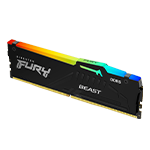
For a modern gaming PC, 16GB of RAM can be a starting point, while 32GB is increasingly attractive for users who game, stream, create content, or multitask heavily.
Professional applications can require even more memory depending on the size and complexity of the projects.
If you are planning a workstation or productivity-focused PC, check the requirements of the applications you use before deciding on your RAM capacity.
You can explore available Memory & Storage options at Vektra PC when planning your build.
Core Ultra 5 vs Core Ultra 7: Which Should You Buy?
The choice between Core Ultra 5 and Core Ultra 7 depends on your workload and budget.
Core Ultra 5 processors can make sense for gamers and general users who want strong performance without moving into a higher CPU tier.
Core Ultra 7 models are better suited to users who regularly run more demanding multi-core workloads, such as professional content creation, rendering, development, and heavy multitasking.
For example, Vektra's 3D Animation & Rendering Workstation uses an Intel Core Ultra 7 265KF with an RTX 5070 Ti 16GB, 32GB DDR5 memory, and a 1TB NVMe SSD.
What Should You Buy?
The best Intel Core Ultra CPU depends on what you actually do with your PC.
If gaming is your priority, focus on the CPU's gaming performance and pair it with an appropriately powerful GPU.
If you game and stream, look for a balanced configuration with enough CPU resources, RAM, GPU performance, and fast storage.
If you work with video editing, 3D rendering, development, or other professional applications, consider moving up the Core Ultra range and prioritizing multi-core performance, memory capacity, and GPU acceleration where applicable.
Rather than choosing the most expensive processor available, build around your actual workload.
Build Your Intel Core Ultra PC With Vektra
Intel Core Ultra processors offer a flexible foundation for modern PCs that need to handle gaming, streaming, productivity, and professional workloads.
The Core Ultra 5 250K Plus is particularly interesting for users who want a versatile processor with 18 cores for a combination of gaming and multitasking.
If you're ready to build, explore Vektra PC's Gaming PC collection or browse the Professional Workstations collection for systems designed around different workloads.